
This list of features is a bit long. If you just want to know what NoSQLBooster has but other MongoDB GUIs don't, please check the list of unique features.
Main Interface
The following figure shows the main interface with a light theme.

The following figure shows the main interface with a dark theme.

AI Helper
NoSQLBooster 11.0 features an upgraded AI Helper with a more capable backend language model, delivering higher-quality responses and better code generation. The AI Helper is fully built-in and requires no configuration from users - it works out of the box with no external API keys or setup required. Users can also configure their own AI API endpoints for custom deployments.
Natural Language Queries
With the power of generative AI, users can now describe their query requirements in natural language, and AI Helper automatically converts these descriptions into standard MongoDB query syntax.
For example, a user might enter:
Find movies directed by Christopher Nolan and released after 2005
And AI Helper generates the corresponding MongoDB query:
use mflix;
db.movies.find({
    director: "Christopher Nolan",
    year: { $gt: 2005 }
})

This feature dramatically reduces the learning curve for MongoDB query syntax, making database operations accessible to developers of all skill levels. The generated find queries can be further refined using NoSQLBooster's existing Visual Query Builder.
Schema-Aware AI Queries
A standout capability of NoSQLBooster's AI Helper is its ability to selectively send database schema information to the AI model, significantly enhancing query generation quality. Users can configure exactly what schema information to include:
- Database names
- Collection names
- Field names and data types
- Index information
By providing this contextual information to the AI, NoSQLBooster generates more accurate, efficient, and schema-compliant queries. This is especially valuable for complex databases where understanding field types and indexes is crucial for performance.
Auto-run query statements
When enabled, read-only mongosh queries will be automatically executed and the results will be displayed in the result window.
True IntelliSense
We offer true IntelliSense experience. The built-in language service knows all possible completions, methods, properties, variables, keywords, even the MongoDB collection names, field names, and operators. The IntelliSense suggestions will pop up as you type. You can always manually trigger it with Ctrl-Shift-Space. Out of the box, Ctrl-Space, Alt-Space are acceptable triggers.

- Pressing F1 will take you to MongoDB online document as the cursor is over a valid MongoDB method.
For an IDE tool, a smart, easy to use code editor is undoubtedly very important, NoSQLBooster gives you the best experience of code editing and script processing. Let you write less, do more.
Learn more about Code Editing and Script Processing Features
Tons of Snippets
We offer tons of built-in snippets to help you writing MongoDB shell script effectively. Typically, you only need to enter a few initial letters of the action, and you'll get the sample template code you need.
- Find, findByObjectId, findTextSearch, findWhereEq, Insert, Update, Delete ...
- SQL, SQL-GROUP-BY, SQL-JOIN, SQL-SUM, SQL-IN-SELECT ...
- Handy date range snippets, e.g. TodayDateRange, LastNWeeksDateRange, LastNMonthsDateRange ...
- Simplify complex MongoDB shell command, e.g. aggregate, createUser, rs.initiate ...
- If you come from a SQL background, these handy SQL to MongoDB conversion snippets may give you some help,
- Create your snippets by hitting F7

Query MongoDB with SQL
With NoSQLBooster for MongoDB, you can run SQL SELECT Query against MongoDB. SQL support includes SQL-JOIN, functions, expressions, aggregation for collections with nested objects and arrays.
See the features and SQL examples supported by the NoSQLBooster for MongoDB.
Let's look at how to use the GROUP BY clause with the SUM function in SQL.
Instead of writing the MongoDB query which is represented as a JSON-like structure
db.employees.aggregate([
    {
        $group: {
            _id: "$department",
            total: { $sum: "$salary" }
        },
    }
])
You can query MongoDB by using familiar SQL which you probably already know.
SELECT department, SUM(salary) AS total FROM employees GROUP BY department
Learn more about Query MongoDB with SQL
MongoDB Script Debugger
unique feature
Still debugging your MongoDB script with print statements? Now, you can use NoSQLBooster's built-in debugging capabilities to set breakpoints and step through code.
To start debugging, click the editor's text margin to set a breakpoint F9, and run with debugger F5. When your breakpoint is hit, you can explore the call stack, watch and edit variables, and interact directly with the debugger.
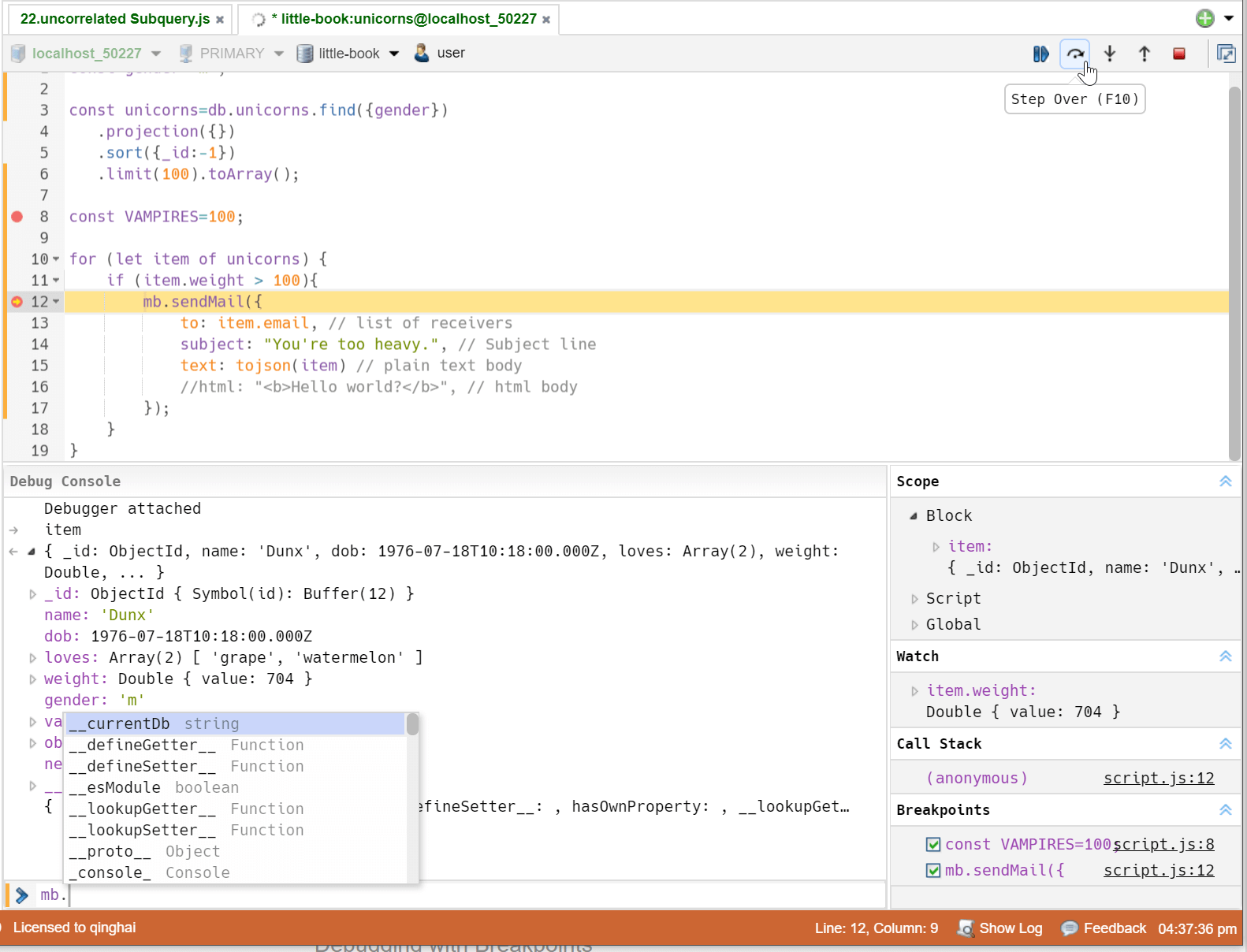
Due to the introduction of the debugger, some keyboard shortcuts have been adjusted, and you can view the bound shortcuts through the button's tooltip.
- Press F5 to start debugging, CTRL+↵|CTRL+F5 to run without debugging.
- Press F6 to run the current statement.
Chaining Fluent Query
unique feature
NoSQLBooster for MongoDB supports mongoose-like fluent query builder API, which enables you to build up a query using chaining syntax, rather than specifying a JSON object. The aggregation framework is now fluent as well. You can use it as currently documented or via the chainable methods.
// instead of writing:
db.user.find({age:{$gte:18,$lte:65}},{name:1,age:1,_id:0}).sort({age:-1, name:1});

// we can write:
db.user.where('age').gte(18).lte(65).select('name age -_id').sort("-age name");

// passing query conditions is permitted too
db.collection.find().where({ name: 'nosqlbooster' })

// chaining
db.collection
    .where('age').gte(18).lte(65)
    .where({ 'name': /^nosqlbooster/i })
    .where('friends').slice(10)

// aggregation
db.companies.aggregate($.where('founded_year').gte(2000).lte(2010)) //$: operator helper
  .group({_id:"$category_code",count:{$sum:1}})
  .sort('-count')
  .limit(100)
Tasks and Task Scheduler
NoSQLBooster tasks allow you to define, save, and perform different types of tasks, including query scripts, imports, exports, data migration, and backup and restore. Task Scheduler lets you define tasks that execute on a one-time basis or a recurring schedule that you specify. It supports tasks that perform daily, weekly, or monthly, and you can choose the day(s) of the week or month when you want each task to execute.
NoSQLBooster does not need to run at the scheduled time to run any scheduled tasks. In Windows systems, NoSQLBooster uses the Windows Task Scheduler to perform routine tasks automatically. While in macOS and Ubuntu, cron is used to manage and execute scheduled tasks.
NoSQLBooster supports the following types of tasks.
- Run MongoDB Script File (As NoSQLBooster allows you to use 3rd party node modules, the functionality of this script is extensible and flexible)
- Import from JSON and BSON files...
- Import Tables from MySQL, PostgreSQL, and MSSQL...
- Restore MongoDB Databases (mongorestore)
- Export Collection/Query to JSON, BSON, CSV|TSV and SQL
- Export Database to JSON, BSON, CSV|TSV, and SQL
- Backup MongoDB Databases (mongodump)
The task view allows you to view all scheduled tasks at a glance easily.


NoSQLBooster Command Line Interface (nbcli)
The nbcli is a simple command-line interface for NoSQLBooster. It allows you to run javascript or SQL query statement, javascript file, and NoSQLBooster tasks in terminal or integrate NoSQLBooster into your continuous development. This nbcli supports all NoSQLBooster shell extensions, SQL Query, fluent Query API, 3rd party library (lodash, momentjs ...) and Node.js modules installed under user data directory (Menu-> Help-> Open User Data directory)
To start nbcli, click "Menu -> Tools -> Open NoSQLBooster Command Line ...", you can use "Menu -> Options -> Add Command Line to path..." to add nbcli to user's PATH.
To be clear, nbcli is not a REPL (Read Evaluate Print Loop) tool.

Visual Explain Plan
NoSQLBooster's Visual Explain transforms explain output into a hierarchical view of the query plan, which is significantly easier to read and understand. It allows for query tuning to enhance query and resolve performance issues.

MongoDB Log Parser
This feature includes two MongoDB log viewers, one for parsing and displaying the most recent 1024 logged MongoD events, and the other for parsing and displaying external MongoDB log files. This tool will parse the log quickly and output general information about its contents, including timestamp, severity, component, context, and command-specific messages. It also allows you to save parsed log entries to MongoDB's collection so that you can further analyze and query the logs using MongoDB's find method.

Query Code Generator
NoSQLBooster for MongoDB comes with a query code generator that allows users to translate MongoDB queries (find, aggregate, or SQL query) to various target languages: MongoDB Shell, JavaScript (Node.js), Java, C#, Python, PHP, Ruby, and Golang. NoSQLBooster Query Code Generator now generates query code for the target language and also creates sample projects for quick execution and testing of generated query code.

Learn MongoDB with Free Interactive Samples
unique feature
The "My Queries" tab is used to open user-saved query scripts quickly. By default, the user-saved query script is saved as a "connection -> database -> query name" directory structure. Double-click to open a saved query script will automatically connect to the appropriate database server and switch to the proper database.
The "Samples" tab includes several NoSQLBooster-Enabled tutorials. All samples are executable in NoSQLBooster already, with detailed descriptions. You can try these queries and change them to learn better.

Visual Query Builder
NoSQLBooster for MongoDB comes with a visual query builder. The two-way query builder could help you construct and display complex MongoDB find statements even without the knowledge of the MongoDB shell commands syntax.

One-click Grouping/Filtering
unique feature
This handy One-Click grouping feature allows grouping of the selected field in query results to calculate counts, totals, minimums, maximums, and averages with a single click. One-click filtering enables the filtering of the selected field-value pairs in query results.

AG-Grid Nested Field Column Groups
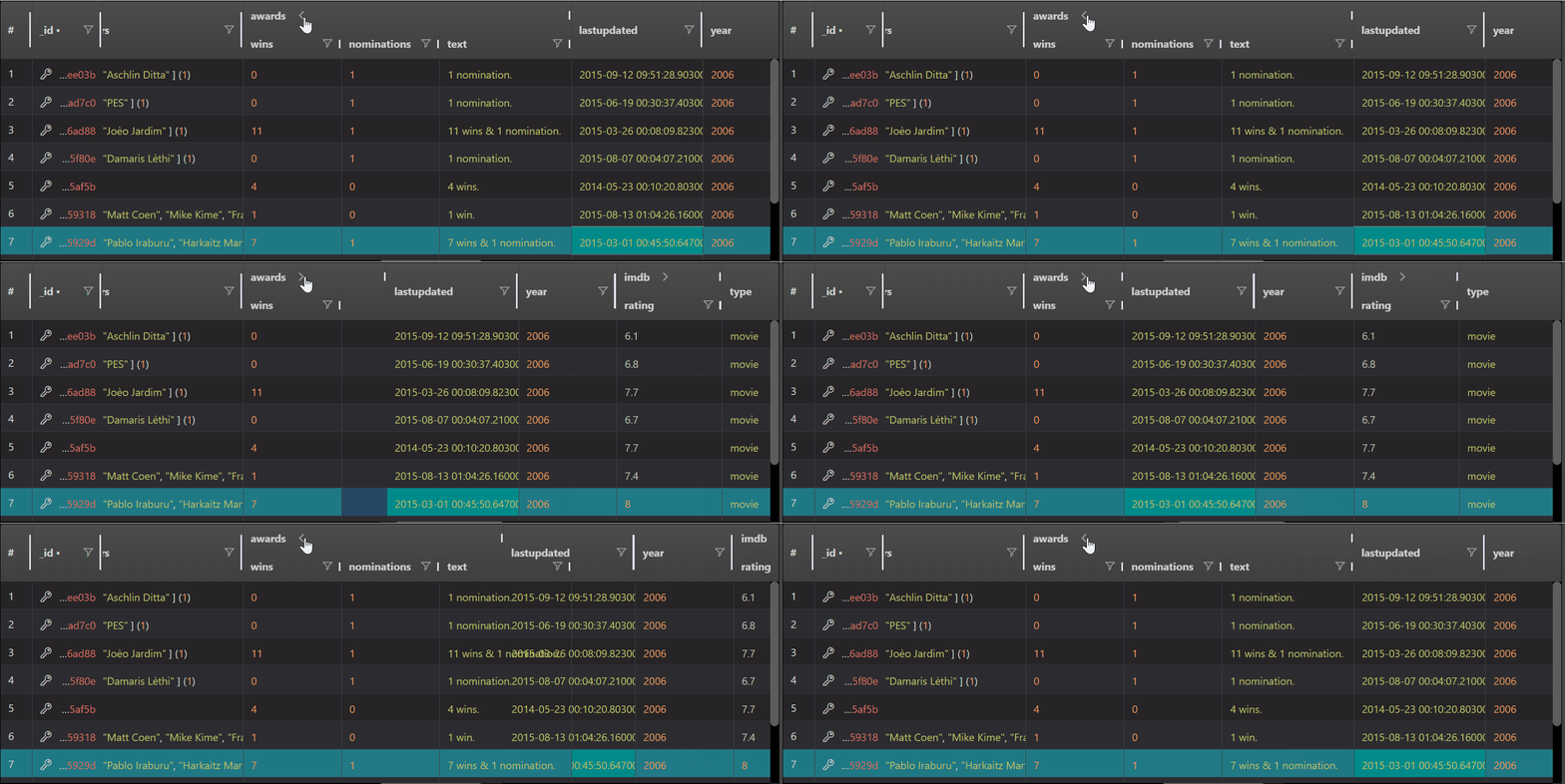
The data viewer automatically organizes nested document fields into collapsible AG-Grid column groups. For example, fields like address.city, address.zip, address.street are grouped under an address parent group, and order.customer.name becomes nested under order → customer. This makes deeply structured MongoDB documents much easier to navigate and analyze at a glance.
You can expand or collapse any column group with a single click, and column widths, ordering, and visibility are all persisted between sessions.
Schema Analyzer
Schema Analyzer is a handy built-in tool. Due to schema-less features, collections in MongoDB do not have a schema document to describe field's datatype, collection structure, and validations. With our brand new Schema Analyzer Tool, you will get a report to specify the schema of specific collection from sampled(random, first, last) N or all records.
The document shows the probability of sampled objects, different types of percentages, and you could get a brief of specific collection's schema. If you want a more accurate result, you could sample more records or analyze the whole collection, but it may take a long time to finish if the collection has millions of records or thousands of fields.
It also shows document validation of the collection, which is a new feature in MongoDB 3.2. There will be a validator window showing below the document. If you click the link, the field will be highlighted in the window.
You could export this document to the most popular document file types, like MS Word, PDF, HTML, along with JSON, TXT, and CSV. Mongoose.js schema file supported as well. Click here to view sample schema file

Collection re-schema tool
The new re-schema tool provides a GUI for updating the MongoDB collection schema. Like other tools provided by NoSQLBooster, it is essentially a code generation tool that helps you generate code to update the collection with a few clicks, and then you can use the generated code as a basis for more complex programming, then save it as a script file, or even add automated tasks.
This feature uses "$convert" operator and update using an aggregation pipeline, requires MongoDB server version 4.2 or above. We also provide a code template called convertFieldType to convert individual fields, which can be used directly in the script editor.

Test Data Generator (Mock Data)
unique feature
Create a large collection with random, but "real data" is available in NoSQLBooster for MongoDB. We now provide more than 100 templates to create random faked "real" data, and you can use this tool to generate mock data with incredibly large size. You could also define how much data is blank too, and how many docs to create. All settings will create a script in the shell, and you could customize it with more complex business logic. We also added several code templates that start with generateTestData to make it easier to generate fake data.

Server Real-Time Status (mongostat)
The mongostat utility provides a quick overview of the status of a currently running mongod or mongos instance. mongostat is functionally similar to the UNIX/Linux file system utility vmstat, but provides data regarding mongod and mongos instances.
NoSQLBooster offers a built-in GUI tool for mongostat too. No external mongostat command-line tools dependence. The tool shows live updates of events that occur on a MongoDB instance in both a chart and a table.

GUI for mongotop
For MongoDB, mongotop does pretty much the same job as the Unix command top; it is used to monitor the Mongo instance. The output of mongotop indicates the amount of time the mongod process spends reading and writing to a specific collection during the update interval. mongotop provides statistics on a per-collection level.
NoSQLBooster for MongoDB offers a built-in GUI tool for mongotop. No external mongotop command-line tools dependence.

MongoDB Enterprise Authentication
NoSQLBooster for MongoDB supports MongoDB Enterprise Edition by adding two new authentication mechanisms Kerberos(GSSAPI) & LDAP(PLAIN), in addition to already supported regular username/password(SCRAM-SHA-1/MONGODB-CR) , X.509 and MONGODB-AWS.

MongoDB commands supports EJSON as parameters
The Extended JSON format defines a reserved set of keys prefixed with "$" to represent field type information that directly corresponds to each type in BSON, the format that MongoDB uses to store data. The MongoDB shell usually uses JavaScript functions to represent MongoDB BSON types. The mongosh's CRUD methods can only use javascript BSON functions as parameters, and do not support EJSON formats, which requires conversion in order to use EJSON in queries. In V9, we have extended the mongosh shell methods to directly support EJSON as method parameters. Both canonical and relaxed formats are supported.
The following three queries are equivalent and can be used directly in V9.
EJSON Relaxed Mode
db.collection.find({
        "_id": {
            "$oid": "6368556b5dfec6090e3e4b6a"
        },
        "int32": 63480,
        "int64": 4127753986432186,
        "double": 33.99535545410777,
        "date": {
            "$date": "2021-11-19T03:16:06.652Z"
        }
    })
EJSON Extended (canonical format)
db.collection.find({
    "_id": {
        "$oid": "6368556b5dfec6090e3e4b6a"
    },
    "int32": {
        "$numberInt": "63480"
    },
    "int64": {
        "$numberLong": "4127753986432186"
    },
    "double": {
        "$numberDouble": "33.99535545410777"
    },
    "date": {
        "$date": {
            "$numberLong": "1637291766652"
        }
    }
})
MongoDB Shell BSON Functions
db.collection.find({
        oid: ObjectId("6368556b5dfec6090e3e4b6a"),
        int32: 63480,
        int64: NumberLong("4127753986432186"),
        double: Double("33.99535545410777"),
        date: ISODate("2021-11-19T11:16:06.652+08:00"),
    })
We also added two editor commands for interchanging EJSON and mongo shell methods. Press Command+Shift+P to open command palette and enter "EJSON".
- Editor: Convert EJSON to mongosh Javascript Object
- Editor: Convert mongosh Javascript Object to EJSON
Embedded Mongosh Engine, No External Dependencies
NoSQLBooster for MongoDB embeds the latest mongosh engine (v2.8) — the same technology that powers the official MongoDB Shell — delivering full MongoDB Shell compatibility with top-level await, modern ES2022+ syntax, and all the latest aggregation operators. You can use any Node.js built-in global objects and modules (console, util, fs, path ...) and pure JS NPM packages in NoSQLBooster. It also adds mongoose-like fluent API, provides mb.runSQLQuery function, integrates a few utility modules (lodash, moment, shelljs, mathjs) to global scope to make the life inside of the MongoDB script a little bit easier.
Learn more about MongoDB Shell and Extensions
ES2022+ Syntax Support
JavaScript ES2022+ has arrived. It lets us write dramatically more concise and readable MongoDB shell script, thanks to built-in support for block variable scoping, arrow functions, template strings, top-level await, optional chaining, nullish coalescing and numerous other improvements to the language.

Lodash, ShellJs, Mathjs and Moment
NoSQLBooster for MongoDB integrates lodash, shelljs, mathjs and momentjs utility library. You can directly use lodash(_), shelljs(shelljs), mathjs(math) and momentjs (moment) in your shell script.

Using Node Modules
You can assemble npm packages like building blocks in your MongoDB shell script. The npm registry hosts almost half a million packages of free, reusable code — the most significant software registry in the world.
Launch NoSQLBooster for MongoDB.
- Execute Main Menu -> Help -> Open User Data Directory
- New Terminal at this folder
npm i axios # run it in NoSQLBooster for MongoDB user data directoryAfter successfully installing this package in the NoSQLBooster for MongoDB User Data Directory, you can require and access it in the NoSQLBooster for MongoDB script.
const axios=require("axios");
const rst = await axios.get('https://api.github.com/users/github'); // top-level await
console.log(rst.data);
Update-in-place
NoSQLBooster for MongoDB supports in-place editing in result tree/table view. Double-click on any value or array element to edit. Full MongoDB data type support in the in-place editor, enabling lossless editing and saving.

Visualizing GeoJSON Objects
NoSQLBooster allows users to visualize the MongoDB GeoJSON Objects quickly. The GeoJSON is a format for encoding geographical data structures, using the JavaScript Object Notation (JSON).

Switch RS Member/Database Within the Editor
In many panels, we have added a replica set members selector that allows you to switch between the members of the replica set in the interface. This is especially convenient for monitoring tools, and many times you want to drill down to a rs member to see the details. You can directly connect and switch members of the replica set within the script editor.

Send MongoDB commands to multiple replica nodes
The replica member switcher now allows you to select multiple/all replica set nodes and send Mongo Shell commands to those nodes at the same time. The following example allows you to quickly view version information for MongoDB instances on all nodes in a replica set.
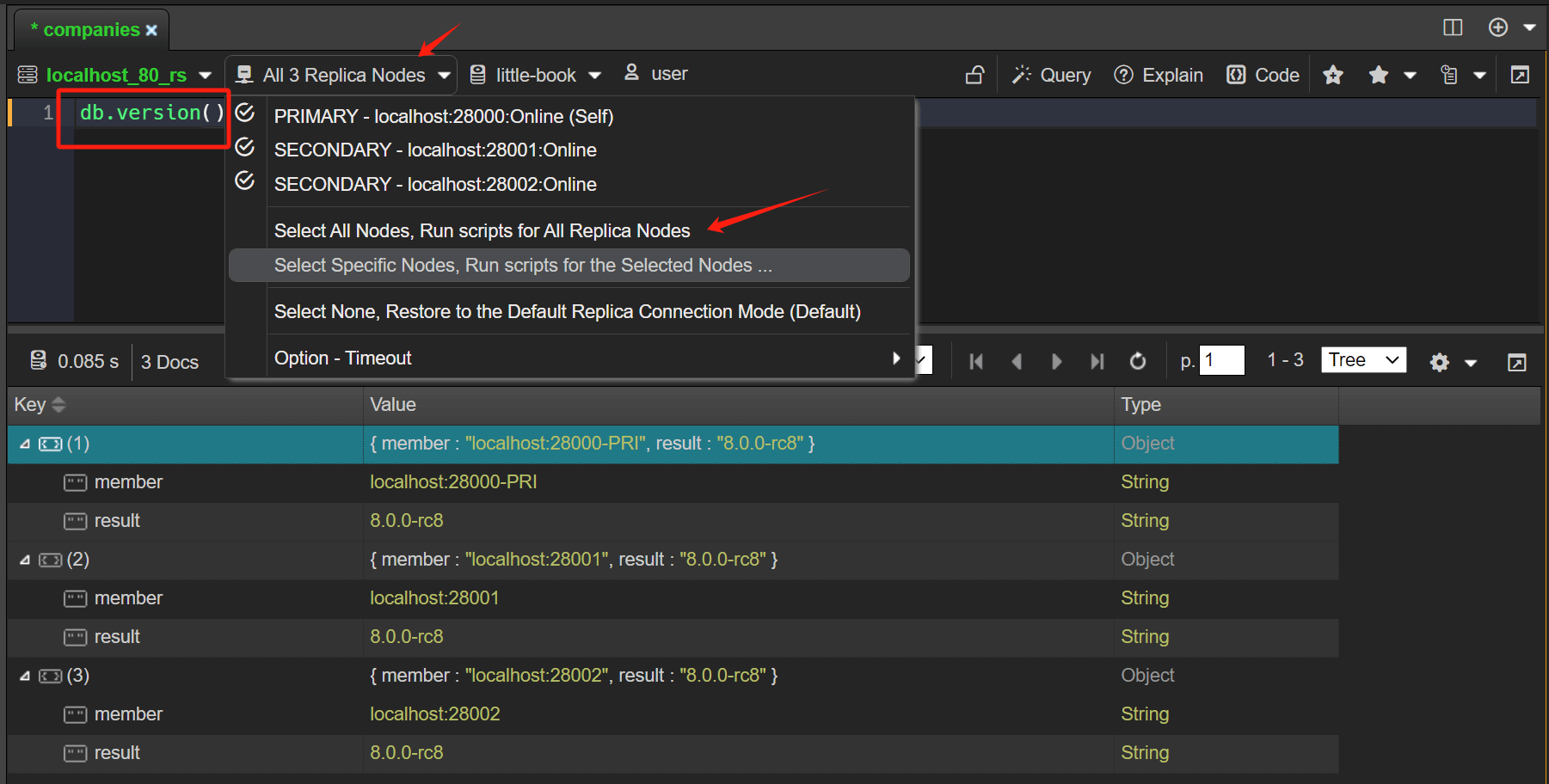
The commands executed are as follows
db.version()The result of the execution is aggregated into a JSON document, the member field indicates the node of the replica set, the primary node will add a PRI indication, if the node has a tag it will also be shown additionally, The result field is the result of the execution of the command on the node.
[{
    "member": "localhost:28000-PRI",
    "result": "8.0.0"
},
{
    "member": "localhost:28001",
    "result": "8.0.0"
},
{
    "member": "localhost:28002",
    "result": "8.0.0"
}
]
As you can see, the replica set is a primary node and two secondary nodes, all of which have MongoDB version 8.0 rc.
Read-only Status-Lock
You do have full access to a production database, but usually, you don't want to change anything by mistake, you could use the read-only status lock. There are two ways to use it:
- Set an entire connection read-only, edit the config make it read-only
- Set any tab read-only temporarily, use the lock button on the tab toolbar
You could unlock temporarily of a locked config by using the unlock button too. The temporary lock/unlock only affects the current tab.

Mark Connection with Color
When working on dev/prod databases simultaneously, you may unintentionally delete or update something on prod rather than dev. Now you could mark prod ones in red and dev in green. It would help you prevent this kind of mistake.

Mark Changed Lines
The feature lets you see which lines have been changed since the last save operation, the new/modified lines are marked at the left margin.

On-the-fly Error Detection
The productive language services continually analyze your code in the background. All errors are reported right in the editor as you type, any line of code with a possible issue is marked in the editor gutter, so you can easily spot it.

Mouse Hover
The mouse hover will show much useful information, such as types of symbols, function definition, type information, and document.

Notable Editor Features
- Syntax highlighting
- Bracket matching
- Automatic indent and outdent
- Search and replace with regular expressions
- Highlight matching parentheses
- Toggle between soft tabs and real tabs
- Display hidden characters
- Drag and drop text by using the mouse
- Line wrapping
- Code folding
Command Palette
Everything NoSQLBooster for MongoDB can do in the Command Palette. See it by using shortcuts: Ctrl-Shift-P. Instead of clicking around all the application menus to look for something, you can just hit Ctrl-Shift-P and search for the command.

Support GridFS
NoSQLBooster for MongoDB fully supports MongoDB's GridFS. With our GridFS Viewer, you can read and write to GridFS collections. Files can be added quickly with drag and drop.

Simply Import and Export
Directly import and export collections from/to JSON/CSV file, like mock data generator, we put all the export/import/copy logic in the shell, you could review the code to make your changes. The progression is shown in the console.log/print tab.
When exporting MongoDB collection or backing up the database regularly, you may want to add the DateTime to the export file path (e.g.,/exports/backup_yyyy_mm_dd.csv) ). The DateTime variable (e.g., %%YYYY_MM_DD%%%) has been added to NoSQLBooster 6, so you can easily append DateTime to the export path. NoSQLBooster uses moment.js to format date and time. For more formatting, see the moment.js website.

SQL Import/Export
NoSQLBooster supports importing data tables from MS SQL Server, MySQL, and PostgreSQL. It also allows you to export mongodb collections as SQL script files.

Easy Data Transfer / Sync Between Databases
NoSQLBooster for MongoDB makes it easy to transfer and sync data between databases in just a few quick steps. You can easily clone databases, add missing records from one database to another, or overwrite collections in the destination database. You can even sync documents from any two databases (based on a matching "_id" field). AND all of the functions of this data transfer/sync can work between ANY connections, so it's trivial to mirror a remote database locally (can be useful for debugging purposes) or to periodically maintain synchronicity between multiple databases deployed across the web.

GUI for MongoDB Import and Export Tools
NoSQLBooster for MongoDB includes GUI tools and task runner for mongoimport, mongoexport, mongodump and mongorestore command-line program.
- mongoexport is a command-line tool that produces a JSON or CSV export of data stored in a MongoDB instance.
- mongoimport imports content from an Extended JSON, CSV, or TSV export created by mongoexport, or potentially, another third-party export tool.
- mongodump is a utility for creating a binary export of the contents of a database. mongodump can export data from either mongod or mongos instances.
- mongorestore program writes data from a binary database dump created by mongodump to a MongoDB instance.

Even more features!
- Auto-updates, so your copy will always be up-to-date. (Auto-updates are not supported for Linux.)
- SSH tunneling for MongoDB connections, support SSH key format: ECDH, ECDSA, and Ed25519
- Simple management of shards and replica sets
- Connection with SSL support
- Auto-restore user workspace.
- Light and dark themes
- Multiple shells, multiple results
- Multiple windows manager, Tile Horizontally and Tile Vertically
- Drag and Drop Tabs Re-ordering
View feature matrix and comparison chart for free, personal and commercial editions/licenses.